Batch Search
Batch Search is a tool that helps you link your existing customers, vendors and contact to Creditsafe. This documentation will only cover customers, but the procedure is the same for vendors.
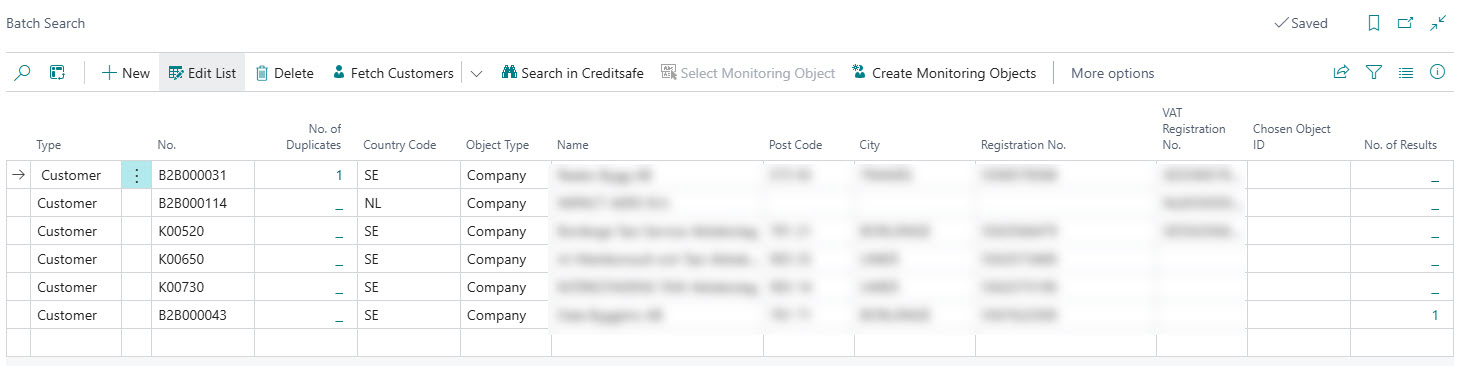
Batch Search is carried out by using information on customers to perform a search in Creditsafe for each customer. If the result is one (1) single match in Creditsafe (the column "No. of Results" above), the resulting Creditsafe-ID will be automatically chosen. If there are more than one matching record in Creditsafe, you need to manually choose which company that is your customer by clicking on "Select Monitoring Object" for each such line to do a manual selection.
Duplicates
There is a one-to-one relation between Customer and Monitoring Object. Creditsafe Connect will only link one (1) customer to one (1) monitoring object and correspondingly only one (1) monitoring object to one (1) customer. This means that you should take care of duplicates before creating monitoring objects.
The column "No. of Dupliactes" and the duplicates factbox shows information about duplicates found based on registration number or VAT registration number. Customers withduplicates are not processed when searching for matching data in Creditsafe. If you want to enforce the creation of a monitoring object for a customer that has duplicates, you can do that from the customer list/card, not the batch search tool. If you link one of the duplicate customers to a monitoring object, that customer (and it's duplicates) is automatically removed from the batch search list.
Tip
If you need more than one customer card for one single legal entity, you should use "Bill-to Customer No." on the customer card to direct all invoicing to one single customer even though the "Sell-to Customer No." differs on individual sales documents. It is the bill-to customer that shall be linked to a monitoring object.
Tip
Having correct VAT registration numbers and/or registration numbers will drastically increase the chance of getting single "hits" in Creditsafe and an automatic selection of a monitoring object. The quality of your customer data has great impact on the possibility of automatically linking customers to monitoring objects.
Usage
Using Batch Search is a three (or four) step process:
- Fetch customers into the worksheet.
- Search in Creditsafe.
- If needed; Select company among the search result manually.
- Create Monitoring objects.
Each step is described below.
Fetch Customers
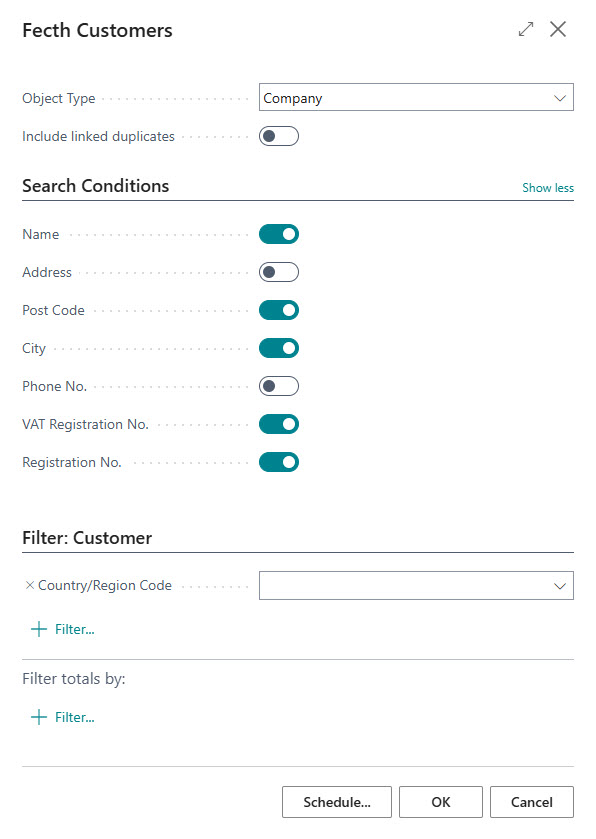
This function imports customers to the batch search worksheet. A customer must fulfill the following criterias to be inserted as a batch search line:
- Bill-to Customer No. must be blank.
- The customer must not already have a relationship with a monitoring object.
- The registration number or VAT registration number must not be used on a customer that has an existing relation with a monitoring object unless the checkbox "Include linked duplicates" is activated.
The checkboxes on the tab "Search Conditions" decide what data to bring from the customer card to the batch search line. If VAT registration number or registration number exists on the customer either one of these number will be used for searching.
Note
For the Swedish and Norwegian datasources Creditsafe supports searching for persons. Therefore you can set the object type when fetching customers. If you have a mix of companies and persons among your customers, you need to fetch customers twice, with different settings for object type and filter on some field on you customers to only fetch persons or companies.
Search in Creditsafe
When you have imported your customers to the batch search worksheet, the next step is to search in Creditsafe. You can search for all lines or a selection of lines. Click on "Search in Creditsafe" to start the search.
If there is a VAT registration number or organization number on the customer, that will be used when searching in creditsafe. The default setting is to also bring the name, post code and city to the batch search line. If no VAT registration number or organization number can be used, the search in Creditsafe will use name, post code and city. If the country supports searching on VAT registration number and/or registration number is defined by settings in the Creditsafe Country table. Click here to learn more about country setup. If the country supports searching on both registration number and VAT registration number and both numbers exist on the customer, the VAT registration number will be used as search criteria.
When the search is completed each line is updated with "No. of Results". If "No of Results" = 1 the "Chosen Object ID" is also updated.
Note
The search will not suggest the same monitoring object ID to more than one (1) customer. If duplicates exist, it will be the first occurrence that will be linked to a monitoring object, therefore you should sort out any duplicates before using the batch search tool.
Select Monitoring Object
If the search resulted in more than one result, you need to select monitoring object manually. Click on "Select Monitoring Object" to open a list with search results and select the company that is your customer.
Create Monitoring Objects
Click on "Create Monitoring Objects" to create monitoring objects for all lines (or a selection of lines) that has a "Chosen Object ID". For each such line a monitoring object will be created and linked to the customer. The Batch Search Line will be deleted so you can continue to work on any unmatched customers.