Monitoring Object Field Mappings
Monitoring Object Field Mappings specifies how data on Monitoring Objects shall update Customer, Vendor and Contact when data reports are fetched from Logtrade. If a field shall be updated is controlled by Customer/Vendor Integration Setup. New fields added to the list will always be updated regardless of Customer/Vendor Integration Setup. )
Note
When customer, vendor or contact is created from a Creditsafe Search, all field mappings are processed based on the data available in the search result, regardless the settings in the Customer/Vendor Integration Setup. Immediately after the Monitoring Object has been created as a part of the customer/vendor/contact creation, a data report is pulled from Creditsafe. From that report download and onwards, the integration settings are respected.
Tip
If you have a field on e.g. the customer card that you want to update with Creditsafe data, you can add that field to the list of field mappings. If the data you want to use is not present as a standard field on the Monitoring Object, you can use one of the five Custom Data fields on the Monitoring Object. You can give Custom Data fields meaningful names by using the Custom Field Captions. The last step in this process is to link a Report Parameter to the custom field by creating a Parameter Mapping.
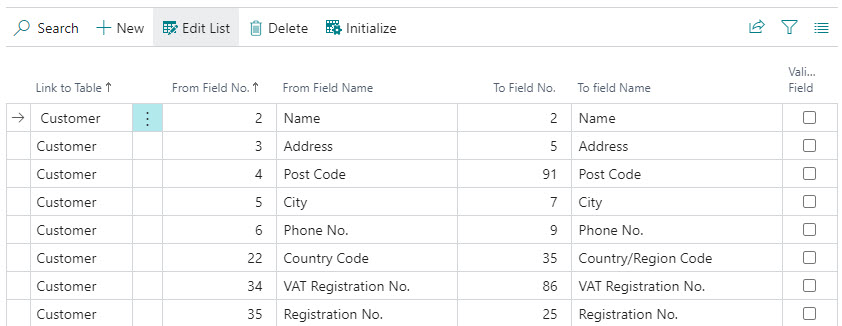
| Field | Description |
|---|---|
| Link to Table | Specifies the table to update. |
| From Field No. | Specifies the field number on the Monitoring Object. |
| From Field Name | Specifies the field name on the Monitoring Object. |
| To Field No. | Specifies to which field numer data shall be written. |
| To Field Name | Specifies the field name of the destination field. |
| Validate Field | Specifies if field validation code shall be triggered on the destination field. |